30% off all plans · No pushy sales calls · First 30 days free
Built for pumping companies — septic, grease traps, and portable restrooms50-state regulatory profiles and trip ticket supportUnlimited users on every plan
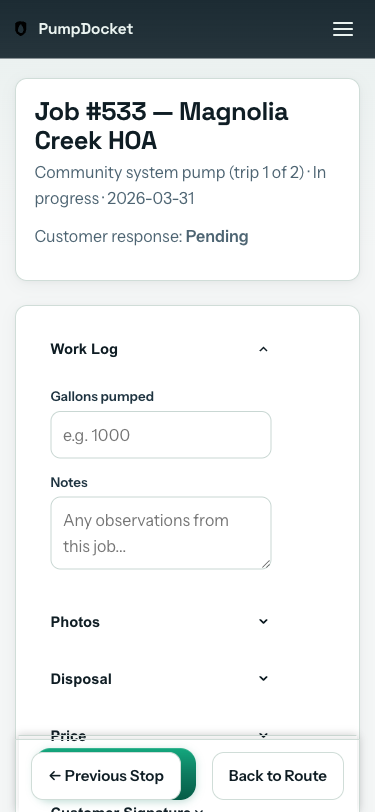
Three taps per job. Works on any phone. No app to download.
STEP 1 OF 9
6:45 AM. Your driver opens his phone.
Step 1
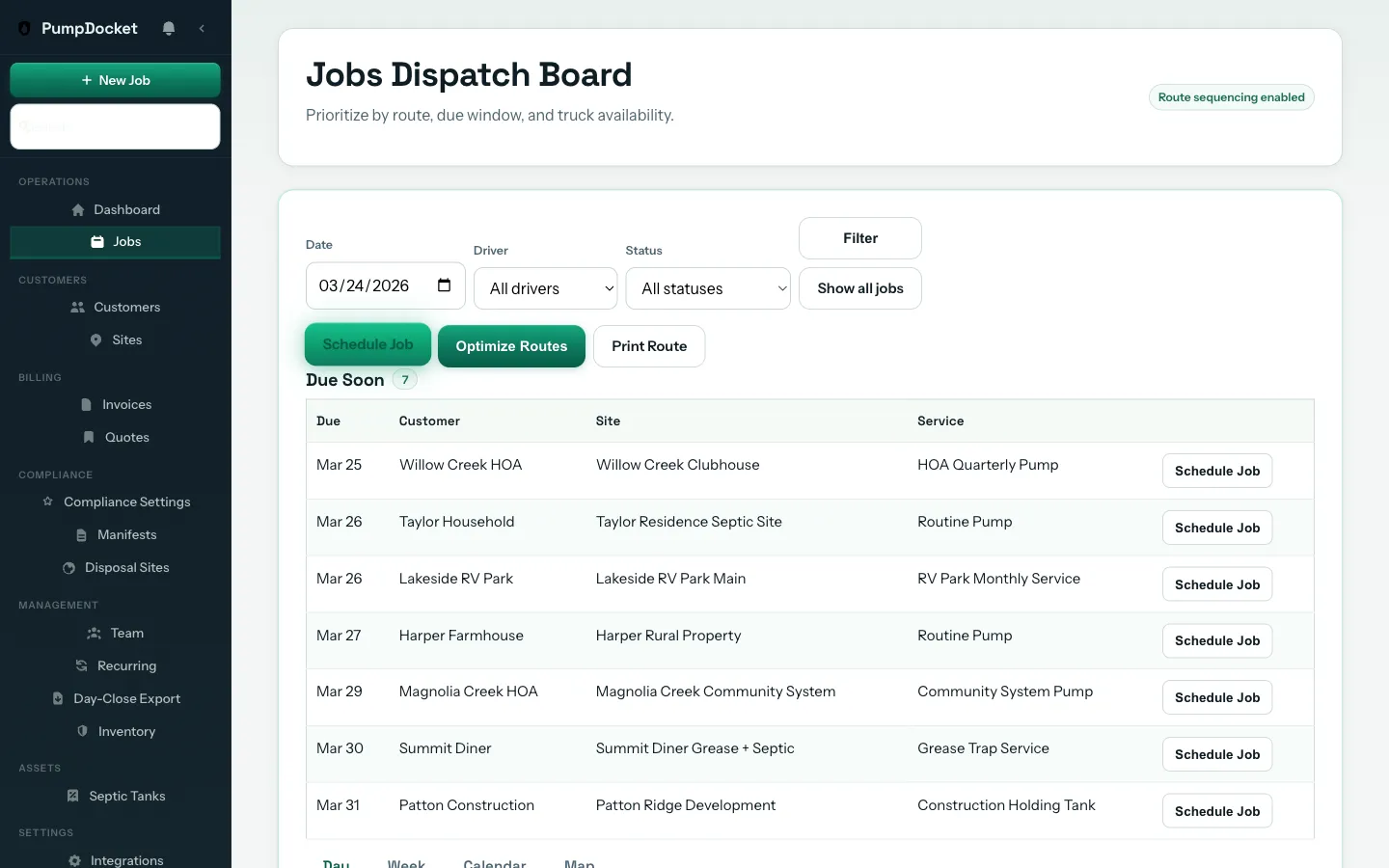
Stop the morning scramble. Dispatch with every detail in one place.
Route sequence, crew assignments, site access notes, tank history — all on one board. No more digging through texts and sticky notes before trucks roll.
Jobs Dispatch BoardSequence, assignees, statuses, and site context — one view.
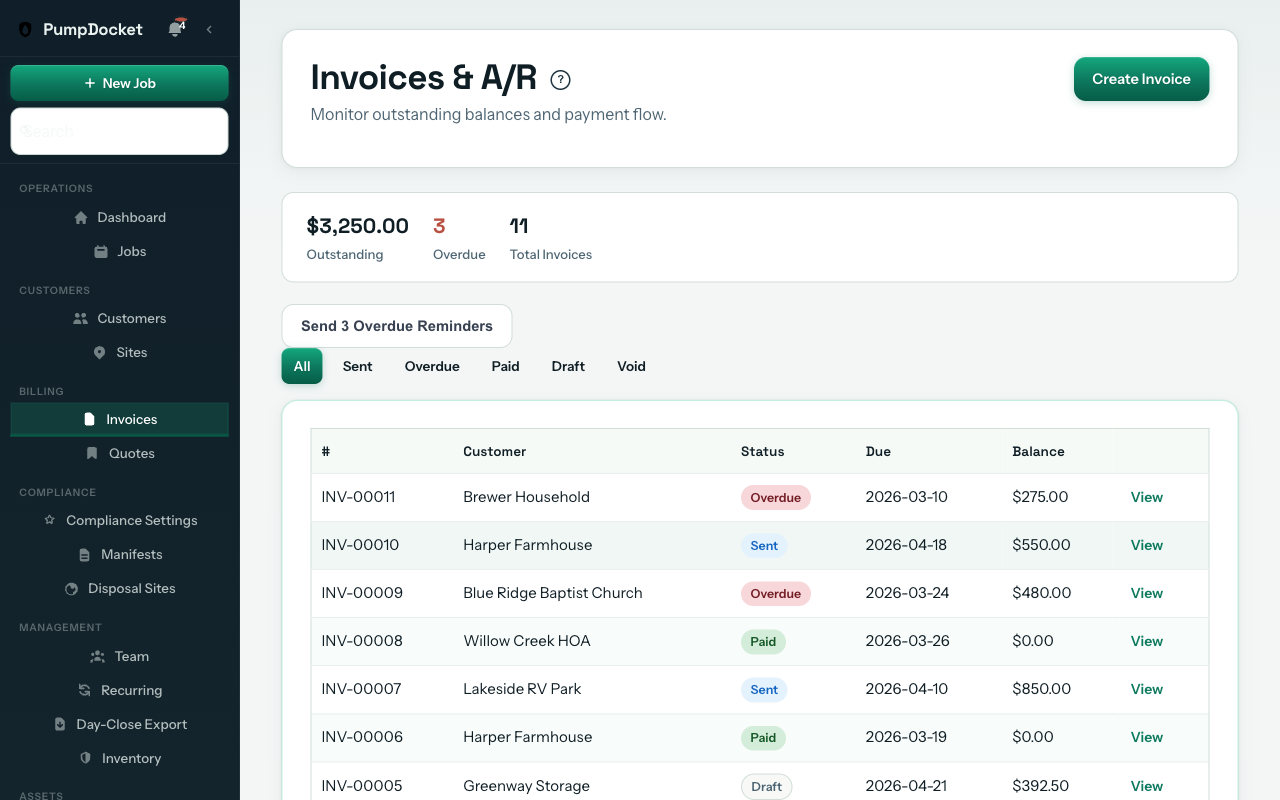
Hand off to accounting the same day — not Friday, not next week.
Completed jobs flow into invoices. Your bookkeeper gets clean data today, not a stack of scribbled tickets on Monday. Customers pay online with Stripe.
Invoicing & Online PaymentsCompleted job data flows to invoices. Customers pay with one click.
Invoice & Get Paid
Same-day invoicing from completed jobs
Online payments via Stripe — customers pay from the link
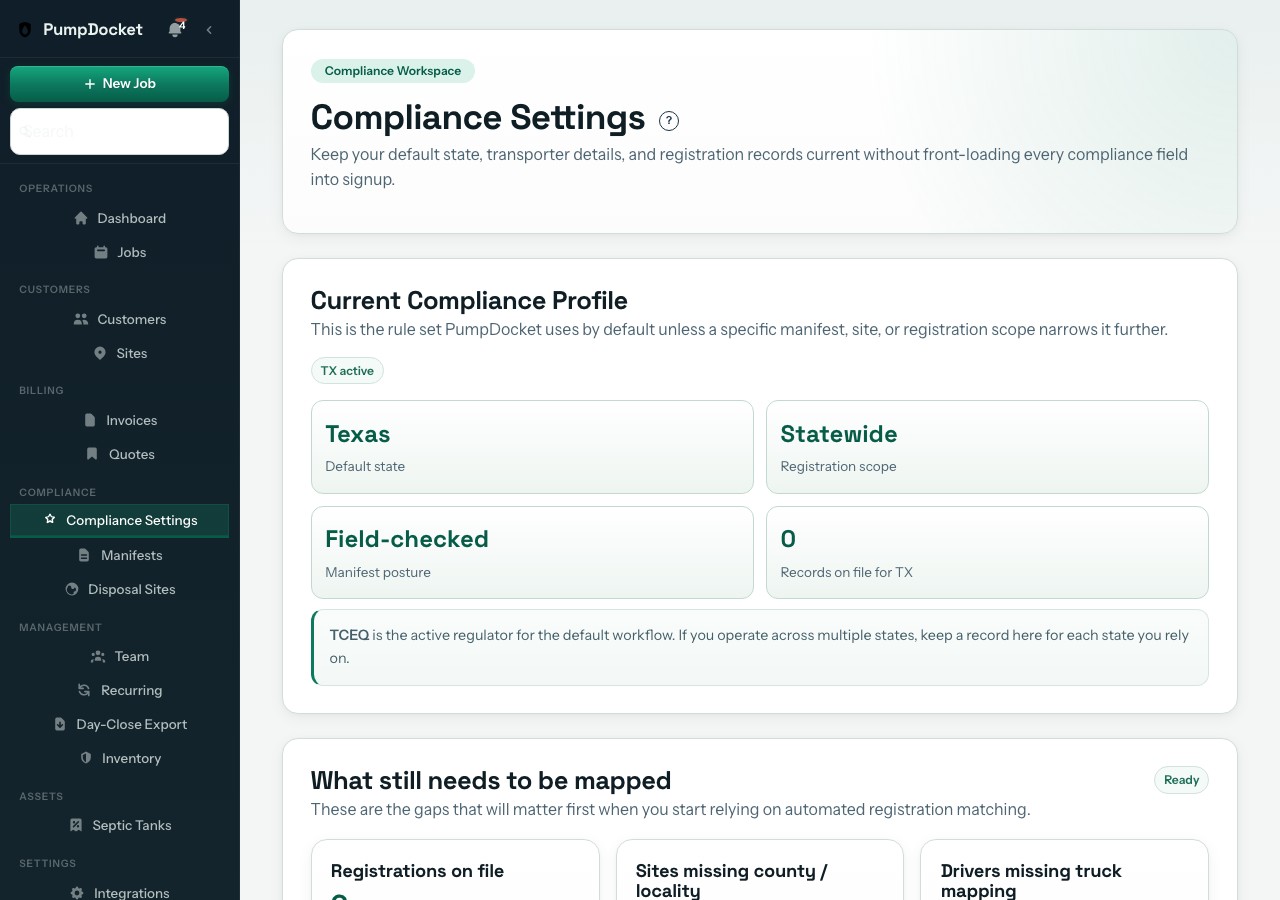
50-state regulatory profiles and trip ticket support.
We maintain 50-state septage and FOG regulatory profiles with official source trails, trip ticket support,
retention references, and jurisdiction notes your team can actually use.
When your driver completes a job, the data flows into a manifest. When you generate the
trip ticket, it uses your jurisdiction profile and the cited source trail behind it. Enhanced
layouts are available where we support a state-specific form.
Most pumping tools leave compliance to paper or custom notes. We keep a 50-state source trail in the workflow instead of treating it like an afterthought.
Portable restroom units have lighter compliance requirements — PumpDocket tracks deployment, servicing, and inventory so you know where every unit is.
In Texas, a single TCEQ violation costs up to $25,000 per day.
Texas Water Code Section 7.102
In Florida, unlicensed septage hauling carries penalties up to $15,000 per day.
Florida Statutes § 403.121
Your $230/month Team plan pays for itself with one avoided fine.
White = enhanced layout matching state form requirements
Trip ticket support tied to your jurisdiction profile
Discrepancy rules shown where the jurisdiction defines them
Retention windows tied back to the source behind the profile
Signature capture — generator, driver, and facility on every manifest
Copy distribution tracking where the jurisdiction requires it
PumpDocket provides regulatory form templates and recordkeeping tools based on publicly available state regulations. We do not guarantee compliance — regulatory requirements change, and compliance is ultimately your responsibility. Consult your state's environmental agency for current requirements.
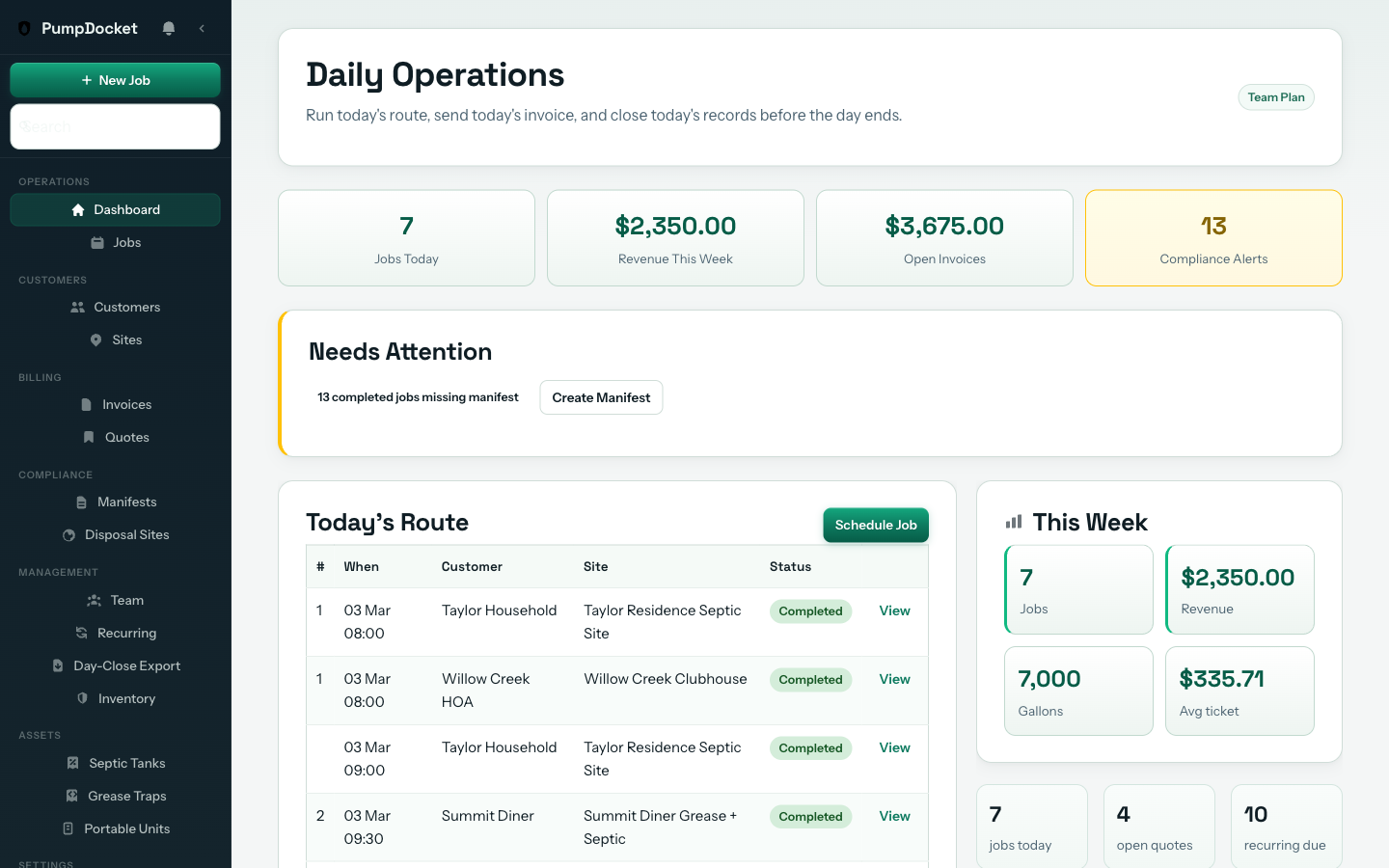
Weekly KPIs show jobs completed, revenue, gallons pumped, and average ticket — with week-over-week trends so you know if you're growing or slipping.
Daily Operations DashboardKPIs, route status, recurring alerts, and compliance — one morning view.
How We Compare
Built for pumping companies. Not for everybody.
Jobber serves 50+ industries. Niche tools often skip billing and compliance. Here's what you actually get with a platform built for septic, grease trap, and portable restroom operators.
PumpDocket
Septic-only tools
Generic FSM
Built for pumping companies
✓ Septic + grease + portable
Septic only
50+ industries
50-state regulatory profiles
✓ All 50 states
1-2 states
—
E-signature proposals
✓
Varies
✓
Customer portal
✓
Varies
✓
Online payments (Stripe)
✓
Varies
✓
Unlimited users
✓ Every plan
Varies
Per-user pricing
Published pricing
✓
Often hidden
✓
Free trial
✓ 30 days
Varies
7-14 days
Offline field completion
✓
Varies
—
Dashboard & KPIs
✓ Jobs, revenue, gallons, trends
Basic
✓
Portable unit tracking
✓ Deploy, service, yard inventory
—
—
Swipe to compare all three columns →
What's Included
Everything your operation needs. One price.
These features are included on every plan. Team's incremental value comes from recurring revenue recovery and audit-grade compliance.
One day. Import your customers, run one crew through dispatch-to-handoff, and export to your bookkeeper. Most owners know by end of day one. See the dispatch workflow above.
How fast can my dispatcher learn this?
Same day. Jobs, site context, and status live on one board — not spread across three tools. Dispatchers pick it up fast because it mirrors how they already think about the route.
Will this break my current billing?
No. Keep QuickBooks, keep your bookkeeper's process. PumpDocket handles dispatch, closeout, and QuickBooks export — your billing stack stays exactly as-is.
Will my drivers actually use it?
Yes. Drivers see their route, tap a job, fill gallons and destination, and complete — three taps. No invoices, no quotes, no settings. Works on any phone, no app to download. Watch the driver workflow above.
How do I stop forgetting recurring customers?
Set the interval once. PumpDocket auto-generates jobs when they are due and sends the customer a heads-up. No spreadsheet, no sticky note, no missed pump-out.
What about compliance?
All 50 states. PumpDocket keeps regulatory profiles for every state with cited source links and trip ticket support. Ten high-volume states (TX, FL, NC, NY, PA, MI, MA, OH, WI, VA) have enhanced layouts matching their specific form requirements. Required-field validation runs where the jurisdiction profile defines those fields. Compliance features are included in Team and Fleet plans. See the compliance engine above.
Do customers get their own portal?
Yes. Each customer gets a secure link to confirm appointments, request rescheduling, view invoices, and pay online. You can also send proposals with a signature pad — customers pick an option, sign digitally, and you're approved without a phone call. See the portal and e-signature tools above.
What if I want invoicing and payments later?
Every plan ships with invoicing and online payments. Connect your Stripe account from the integrations page (free, 5 minutes) to start accepting card payments today.
What support do I get?
Onboarding help is included with every plan. We walk you through import, setup, and your first live route. Team and Fleet plans include priority support.
What happens after the free 30 days?
Your card is collected at signup but not charged during the first 30 days. On day 31, your selected plan auto-bills month-to-month. Cancel before then and you're never charged. If you cancel, your workspace pauses — data stays available if you come back.
Same-day handoff
Jobs export to your bookkeeper the day they run — not Friday.
Live status all day
See which jobs are done without calling drivers at 5 PM.
Fewer callbacks
Field closeout captures details at the truck. No chasing drivers.
Use it for 30 days. Free.
Import your customers, set your state, and dispatch one crew on day one. If your handoff isn't cleaner, if your paperwork isn't done before the last truck parks, if you're not saving hours every week on compliance and closeout — cancel before you're ever charged. Keep your data. Keep your manifests. Keep everything we generated.
We built it for haulers. If it doesn't work for you, we don't deserve your money.